terminal-menu / 0.3.2 last updated 2 years ago created on Jun 13th 2013
Install
npm install --save terminal-menu
Clone
git clone git@github.com:substack/terminal-menu.git
 substack
| 0.3.2 | 2 years ago | substack |
| 0.3.1 | 2 years ago | substack |
| 0.3.0 | 2 years ago | substack |
| 0.2.0 | 2 years ago | substack |
| 0.1.0 | 2 years ago | substack |
| 0.0.0 | 3 years ago | substack |
readme
terminal-menu
retro ansi terminal menus for serious 80s technicolor business
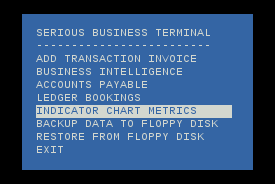
example
methods
var menu = createMenu(opts)
Create a menu with opts:
opts.width- menu width in columnsopts.x- top-left corner x offset, default: 1opts.y- top-left corner y offset, default: 1opts.fg- foreground color, default: 'white'opts.bg- background color, default: 'blue'opts.padding.left- left padding in columnsopts.padding.right- right padding in columnsopts.padding.top- top padding in rowsopts.padding.bottom- bottom padding in rows
The menu can be driven around with the arrow keys and j/k, vi-style.
To quit out of the menu, hit ^C or q.
menu.add(label)
Create a new selectable menu item with the string label.
menu.write(msg)
Write a message to the menu.
menu.createStream()
Return the stream to be piped to a terminal.
menu.reset()
Reset the terminal, clearing all contents.
menu.close()
Unregister all listeners and put the terminal back to its original state.
install
With npm do:
license
MIT