schema-inspector / 1.6.4 last updated 2 months ago created on Jan 2nd 2014
Install
npm install --save schema-inspector
Clone
git clone git@github.com:Atinux/schema-inspector.git
| 1.6.4 | 2 months ago | atinux |
| 1.6.3 | 2 months ago | atinux |
| 1.6.2 | 3 months ago | atinux |
| 1.6.1 | 3 months ago | atinux |
| 1.6.0 | 3 months ago | atinux |
| 1.5.9 | 4 months ago | atinux |
| 1.5.8 | 4 months ago | atinux |
| 1.5.7 | 4 months ago | atinux |
| 1.5.6 | 4 months ago | atinux |
| 1.5.5 | 6 months ago | atinux |
| 1.5.4 | 8 months ago | atinux |
| 1.5.3 | 8 months ago | atinux |
| 1.5.2 | 8 months ago | atinux |
| 1.5.1 | a year ago | atinux |
| 1.5.0 | a year ago | atinux |
| 1.4.9 | a year ago | atinux |
| 1.4.8 | 2 years ago | atinux |
| 1.4.7 | 2 years ago | atinux |
| 1.4.6 | 2 years ago | atinux |
| 1.4.5 | 2 years ago | atinux |
| 1.4.4 | 2 years ago | atinux |
| 1.4.3 | 2 years ago | atinux |
| 1.4.2 | 2 years ago | atinux |
| 1.4.1 | 2 years ago | atinux |
| 1.4.0 | 2 years ago | atinux |
| 1.3.9 | 2 years ago | atinux |
| 1.3.8 | 2 years ago | atinux |
| 1.3.6 | 2 years ago | atinux |
| 1.3.5 | 2 years ago | atinux |
| 1.3.4 | 2 years ago | atinux |
| 1.3.3 | 2 years ago | atinux |
| 1.3.2 | 2 years ago | atinux |
| 1.3.1 | 2 years ago | atinux |
readme

Schema-Inspector is a powerful tool to sanitize and validate JS objects. It's designed to work both client-side and server-side and to be scalable with allowing asynchronous and synchronous calls.



See a live example: http://atinux.github.io/schema-inspector/
Installation
Node.js
npm install schema-inspector
Browser
bower install schema-inspector(Or download async.js and schema-inspetor.js manually).
How it looks like
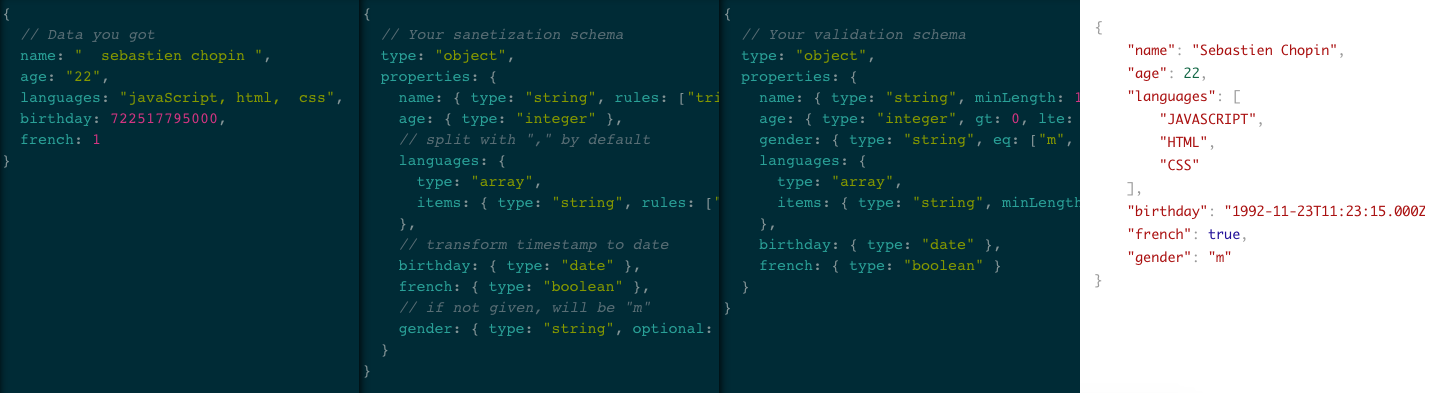 Click to see it live!
Usage
Tips: it's recommended to use one schema for the sanitzation and another for the validation,
In the browser
In the example below, the inspector variable will be used. For the client-side use SchemaInspector instead of inspector.
Documentation
Validation
- type
- optional
- pattern
- minLength, maxLength, exactLength
- lt, lte, gt, gte, eq, ne
- someKeys
- strict
- exec
- properties
- items
- alias
- error
- code
Sanitization
Custom fields
Asynchronous call
Thanks to:
- (major contributor of this awesome module)
Validation
type
- type: string, array of string.
- usable on: any.
- possible values
stringnumberintegerbooleannulldate(instanceof Date), you can use thevalidDate: trueto check if the date is validobject(constructor === Object)array(constructor === Array)- A function (candidate isinstance)
any(it can be anything)
Allow to check property type. If the given value is incorrect, then type is not checked.
Example
optional
- type: boolean.
- default: false.
- usable on: any.
This field indicates whether or not property has to exist.
Example
uniqueness
- type: boolean.
- default: false.
- usable on: array, string.
If true, then we ensure no element in candidate exists more than once.
Example
pattern
- type: string, RegExp object, array of string and RegExp.
- usable on: string.
- Possible values as a string:
void,url,date-time,date,coolDateTime,time,color,email,numeric,integer,decimal,alpha,alphaNumeric,alphaDash,javascript,upperString,lowerString.
Ask Schema-Inspector to check whether or not a given matches provided patterns. When a pattern is a RegExp, it directly test the string with it. When it's a string, it's an alias of a RegExp.
Example
minLength, maxLength, exactLength
- type: integer.
- usable on: array, string.
Example
lt, lte, gt, gte, eq, ne
- type: number (string, number and boolean for eq).
- usable on: number (string, number and boolean for eq).
Check whether comparison is true:
- lt:
< - lte:
<= - gt:
> - gte:
>= - eq:
=== - ne:
!==
Example
someKeys
- type: array of string.
- usable on: object.
Check whether one of the given keys exists in object (useful when they are optional).
Example
strict
- type: boolean.
- default: false.
- usable on: object.
Only keys provided in field "properties" may exist in object. Strict will be ignored if properties has the special key '*'.
Example
exec
- type: function, array of function.
- usable on: any.
Custom checker =). "exec" functions take two three parameter
(schema, post [, callback]). To report an error, use this.report([message], [code]).
Very useful to make some custom validation.
Example
properties
- type: object.
- usable on: object.
For each property in the field "properties", whose value must be a schema, validation is called deeper in object.
The special property '*' is validated against any properties not specifically listed.
Example
items
- type: object, array of object.
- usable on: array.
Allow to apply schema validation for each element in an array. If it's an object, then it's a schema which will be used for all the element. If it's an array of object, then it's an array of schema and each element in an array will be checked with the schema which has the same position in the array.
Example
alias
- type: string.
- usable on: any.
Allow to display a more explicit property name if an error is encounted.
Example
error
- type: string.
- usable on: any.
This field contains a user sentence for displaying a more explicit message if an error is encounted.
Example
code
- type: string.
- usable on: any.
This field contains a user code for displaying a more uniform system to personnalize error message.
Example
Sanitization
type
- type: string.
- usable on: any.
- possible values
numberintegerstringbooleandate(constructor === Date)object(constructor === Object)array(constructor === Array)
Cast property to the given type according to the following description:
- to number from:
- string (ex: "12.34" -> 12.34)

- date (ex: new Date("2014-01-01") -> 1388534400000)

- string (ex: "12.34" -> 12.34)
- to integer from:
- number
- 12.34 -> 12
- string
- "12.34" -> 12
- boolean
- true -> 1
- false -> 0
- date
- new Date("2014-01-01") -> 1388534400000
- number
- to string from:
- boolean
- true -> "true"
- number
- 12.34 -> "12.34"
- integer
- 12 -> "12"
- date
- new Date("2014-01-01") -> "Wed Jan 01 2014 01:00:00 GMT+0100 (CET)"
- array
- [12, 23, 44] -> '12,34,45'
- To join with a custom string, use joinWith key (example: { type: "string", joinWith: "|" } will transform [12, 23, 44] to "12|23|44").
- boolean
- to date from:
- number / integer
- 1361790386000 -> Wed Jan 01 2014 01:00:00 GMT+0100 (CET)
- string
- "2014-01-01 -> Wed Jan 01 2014 01:00:00 GMT+0100 (CET)
- "Wed Jan 01 2014 01:00:00 GMT+0100 (CET)" -> Wed Jan 01 2014 01:00:00 GMT+0100 (CET)
- number / integer
- to object from:
- string
- '{"love":"open source"}' -> { love: "open source" }
- string
- to array from:
- string ("one,two,three" -> ["one", "two", "three"], '[1,"two",{"three":true}]' -> [ 1, 'two', { three: true } ])
- anything except undefined and array (23 -> [ 23 ])
- To split with a custom string (other than ","), use the key splitWith (example: { type: "array", splitWith: "|"" } will transform "one|two|three" to ["one", "two", "three"]).*
Example
def
- type: any.
- usable on: any.
Define default value if property does not exist, or if type casting is to fail because entry type is not valid (cf type).
Example
optional
- type: boolean.
- default: true.
- usable on: any.
Property is set to schema.def if not provided and if optional is false.
Example
rules
- type: string, array of string.
- usable on: string.
- possible values:
upper: Every character will be changed to uppercase.lower: Every character will be changed to lowercase.title: For each word (/\S*/g), first letter will be changed to uppercase, and the rest to lowercase.capitalize: Only the first letter of the string will be changed to uppercase, the rest to lowercase.ucfirst: Only the first letter of the string will be changed to uppercase, the rest is not modified.trim: Remove extra spaces.
Apply the given rule to a string. If several rules are given (array), then they are applied in the same order than in the array.

Example
min, max
- type: string, number.
- usable on: string, number.
Define minimum and maximum value for a property. If it's less than minimum, then it's set to minimum. If it's greater than maximum, then it's set to maximum.

Example
minLength, maxLength
- type: integer.
- usable on: string.
Adjust string length to the given number.
TODO: We must be able to choose which character we want to fill the string with.
Example
strict
- type: boolean.
- default: false.
- usable on: any.
Only key provided in field "properties" will exist in object, others will be deleted.
Example
exec
- type: function, array of functions.
- usable on: any.
Custom checker =). "exec" functions take two three parameter
(schema, post [, callback]), and must return the new value. To report an
sanitization, use this.report([message]). Very useful to make some custom
sanitization.
NB: If you don't want to return a differant value, simply return post,
do not return nothing (if you do so, the new value will be undefined).
Example
properties
- type: object.
- usable on: object.
Work the same way as validation "properties".
items
- type: object, array of object.
- usable on: array.
Work the same way as validation "items".
Custom fields
punctual use
When you need to use the same function in exec field several time, instead of
saving the function and declaring exec several times, just use custom field.
First you have to provide a hash containing a function for each custom field you
want to inject. Then you can call them in your schema with $"your field name".
For example if you
provide a custom field called "superiorMod", you can access it with name
"$superiorMod".
Example
extension
Sometime you want to use a custom field everywhere in your program, so you may extend Schema-Inspector to do so. Just call the method inspector.Validation.extend(customFieldObject) or inspector.Sanitization.extend(customFieldObject). If you want to reset, simply call inspector.Validation.reset() or inspector.Sanitization.reset(). You also can remove a specific field by calling inspector.Validation.remove(field) or inspector.Sanitization.remove(field).
Example
Context
Every function you declare as a custom parameter, or with exec field will be
called with a context. This context allows you to access properties, like
this.report() function, but also this.origin, which is equal to the object
sent to inspector.validate() or inspector.sanitize().
Example
Asynchronous call
How to
All of the examples above used synchronous calls (the simplest). But sometimes you
want to call validation or sanitization asynchronously, in particular with
exec and custom fields. It's pretty simple: To do so, just send a callback
as extra parameter. It takes 2 parameters: error and result. Actually
Schema-Inspector should send back no error as it should not throw any if called
synchronously. But if you want to send back and error in your custom function,
inspection will be interrupted, and you will be able to retrieve it in your
callback.
You also have to declare a callback in your exec or custom function to make
Schema-Inspector call it asynchronously, else it will be call synchronously.
That means you may use exec synchronous function normally even during
and asynchronous call.
Example
Example with custom field
Here is a full example where you may have to use it: