colors / 1.0.3 last updated a month ago created on Mar 15th 2011

Install

npm install --save colors

Clone

git clone git@github.com:Marak/colors.js.git

dependencies

No dependencies listed.

maintainers

marak

versions 8 total

1.0.3 a month ago marak
1.0.2 a month ago marak
1.0.1 a month ago marak
1.0.0 a month ago marak
0.6.2 a year ago marak
0.6.1 a year ago marak
0.6.0 3 years ago marak
0.6.0-1 3 years ago marak
76022 Downloads yesterday.

readme

colors.js

get color and style in your node.js console
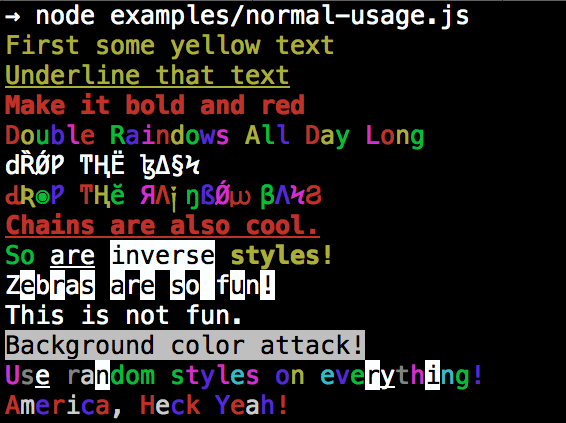
Installation

npm install colors

colors and styles!

text colors

  • black
  • red
  • green
  • yellow
  • blue
  • magenta
  • cyan
  • white
  • gray
  • grey

background colors

  • bgBlack
  • bgRed
  • bgGreen
  • bgYellow
  • bgBlue
  • bgMagenta
  • bgCyan
  • bgWhite

styles

  • reset
  • bold
  • dim
  • italic
  • underline
  • inverse
  • hidden
  • strikethrough

extras

  • rainbow
  • zebra
  • america
  • trap
  • random

Usage

By popular demand, colors now ships with two types of usages!

The super nifty way

1
2
3
4
5
6
7
var colors = require('colors');

console.log('hello'.green); // outputs green text
console.log('i like cake and pies'.underline.red) // outputs red underlined text
console.log('inverse the color'.inverse); // inverses the color
console.log('OMG Rainbows!'.rainbow); // rainbow
console.log('Run the trap'.trap); // Drops the bass

or a slightly less nifty way which doesn't extend String.prototype

1
2
3
4
5
6
7
var colors = require('colors/safe');

console.log(colors.green('hello')); // outputs green text
console.log(colors.red.underline('i like cake and pies')) // outputs red underlined text
console.log(colors.inverse('inverse the color')); // inverses the color
console.log(colors.rainbow('OMG Rainbows!')); // rainbow
console.log(colors.trap('Run the trap')); // Drops the bass

I prefer the first way. Some people seem to be afraid of extending String.prototype and prefer the second way.

If you are writing good code you will never have an issue with the first approach. If you really don't want to touch String.prototype, the second usage will not touch String native object.

Disabling Colors

To disable colors you can pass the following arguments in the command line to your application:

node myapp.js --no-color

Console.log string substitution

1
2
3
var name = 'Marak';
console.log(colors.green('Hello %s'), name);
// outputs -> 'Hello Marak'

Custom themes

Using standard API

var colors = require('colors');

colors.setTheme({
  silly: 'rainbow',
  input: 'grey',
  verbose: 'cyan',
  prompt: 'grey',
  info: 'green',
  data: 'grey',
  help: 'cyan',
  warn: 'yellow',
  debug: 'blue',
  error: 'red'
});

// outputs red text
console.log("this is an error".error);

// outputs yellow text
console.log("this is a warning".warn);

Using string safe API

var colors = require('colors/safe');

// set single property
var error = colors.red;
error('this is red');

// set theme
colors.setTheme({
  silly: 'rainbow',
  input: 'grey',
  verbose: 'cyan',
  prompt: 'grey',
  info: 'green',
  data: 'grey',
  help: 'cyan',
  warn: 'yellow',
  debug: 'blue',
  error: 'red'
});

// outputs red text
console.log(colors.error("this is an error"));

// outputs yellow text
console.log(colors.warn("this is a warning"));

Protip: There is a secret undocumented style in colors. If you find the style you can summon him.

Resolving all dependencies.. This could take a while as our cache is not yet fully warmed up.