colorguard / 0.2.0 last updated a year ago created on Jul 7th 2014

Install

npm install --save colorguard

Clone

git clone git@github.com:SlexAxton/css-colorguard.git

dependencies show all 22

main color-diff 0.1.3 BSD 4-Clause
pipetteur 1.0.1 MIT
rework-walk 1.0.0 MIT
yargs 1.3.1 MIT
rework 1.0.0 MIT

maintainers

slexaxton

versions 10 total

0.2.0 a year ago slexaxton
0.1.8 a year ago slexaxton
0.1.7 a year ago slexaxton
0.1.6 a year ago slexaxton
0.1.5 a year ago slexaxton
0.1.4 a year ago slexaxton
0.1.3 a year ago slexaxton
0.1.2 a year ago slexaxton
0.1.1 a year ago slexaxton
0.1.0 a year ago slexaxton
81 Downloads yesterday.

readme

Build Status

CSS Colorguard

Every CSS project starts out with good intentions, but inevitably, one too many people eye-dropper colors into nooks and crannies that you never knew existed. CSS Colorguard helps you maintain the color set that you want, and warns you when colors you've added are too similar to ones that already exist. Naturally, it's all configurable to your tastes.

Usage

Generally, you'll want to do this after you've run things through your css preprocessor, so variables and other preprocessor specific things are out of the way.

Command Line

$ npm install -g colorguard
# Just regular
colorguard --file style.css

# pipe a file
cat file.css | colorguard

# Threshold is available via command line
colorguard --file style.css --threshold 3

# The other options are too hard to type, so just pass it a json object
# with `ignore` or `whitelist` properties (overrides `--threshold option`)
colorguard --file style.css --options colorguard.json

# Change the output type to full json (includes stats)
colorguard --file style.css --format json

Example output

1
2
3
4
5
6
7
$ colorguard --file test/fixtures/simple.css
Collision: #020202, #000000
  - #020202 [line: 2] is too close (0.3146196209793196) to #000000 [line: 2, 3, 7, 12, 13, 16, 17]
Collision: #020202, #010101
  - #020202 [line: 2] is too close (0.1574963682909058) to #010101 [line: 20]
Collision: #000000, #010101
  - #000000 [line: 2, 3, 7, 12, 13, 16, 17] is too close (0.15712369811016996) to #010101 [line: 20]
$ cat test/fixtures/simple.css | colorguard --format json
{"collisions":[{"colors":[{"rgb":"#020202","lines":[2]},{"rgb":"#000000","lines":[2,3,7,12,13,16,17]}],"distance":0.3146196209793196,"message":"#020202 [line: 2] is too close (0.3146196209793196) to #000000 [line: 2, 3, 7, 12, 13, 16, 17]"},{"colors":[{"rgb":"#020202","lines":[2]},{"rgb":"#010101","lines":[20]}],"distance":0.1574963682909058,"message":"#020202 [line: 2] is too close (0.1574963682909058) to #010101 [line: 20]"},{"colors":[{"rgb":"#000000","lines":[2,3,7,12,13,16,17]},{"rgb":"#010101","lines":[20]}],"distance":0.15712369811016996,"message":"#000000 [line: 2, 3, 7, 12, 13, 16, 17] is too close (0.15712369811016996) to #010101 [line: 20]"}],"info":[{"colors":[{"rgb":"#020202","lines":[2]},{"rgb":"#000000","lines":[2,3,7,12,13,16,17]}],"distance":0.3146196209793196,"message":"#020202 [line: 2] is too close (0.3146196209793196) to #000000 [line: 2, 3, 7, 12, 13, 16, 17]"},{"colors":[{"rgb":"#020202","lines":[2]},{"rgb":"#663399","lines":[9]}],"distance":34.12252478659537},{"colors":[{"rgb":"#020202","lines":[2]},{"rgb":"#010101","lines":[20]}],"distance":0.1574963682909058,"message":"#020202 [line: 2] is too close (0.1574963682909058) to #010101 [line: 20]"},{"colors":[{"rgb":"#020202","lines":[2]},{"rgb":"#FFFFFF","lines":[21]}],"distance":99.42663222854084},{"colors":[{"rgb":"#000000","lines":[2,3,7,12,13,16,17]},{"rgb":"#663399","lines":[9]}],"distance":34.321183445222175},{"colors":[{"rgb":"#000000","lines":[2,3,7,12,13,16,17]},{"rgb":"#010101","lines":[20]}],"distance":0.15712369811016996,"message":"#000000 [line: 2, 3, 7, 12, 13, 16, 17] is too close (0.15712369811016996) to #010101 [line: 20]"},{"colors":[{"rgb":"#000000","lines":[2,3,7,12,13,16,17]},{"rgb":"#FFFFFF","lines":[21]}],"distance":100},{"colors":[{"rgb":"#663399","lines":[9]},{"rgb":"#010101","lines":[20]}],"distance":34.22102591917981},{"colors":[{"rgb":"#663399","lines":[9]},{"rgb":"#FFFFFF","lines":[21]}],"distance":60.25283160954553},{"colors":[{"rgb":"#010101","lines":[20]},{"rgb":"#FFFFFF","lines":[21]}],"distance":99.7195446868893}],"stats":{"counts":{"#020202":1,"#000000":7,"#663399":1,"#010101":1,"#FFFFFF":1},"total":5}}

Programmatic

$ npm install --save-dev colorguard
var colorguard = require('colorguard');
var fs = require('fs');

var css = fs.readFileSync('./file.css', 'utf8');

var output = colorguard.inspect(css, {
  // 0 through 100. Lower is more similar. Anything below 3 warns you.
  // 3 is the default threshold, but that's mostly personal opinion
  threshold: 3,

  // This color is just ignored entirely (use with caution)
  ignore: ["#030303"],

  // These color combinations are ignored (usually use this)
  whitelist: [["#000000", "#010101"]]
});

Build Time

CSS Colorguard can also be used in conjunction with other javascript build systems, such as:

The Output

You'll get warnings back (as an object via js or if the format is set to json), as well as some additional color stats. Those are just for fun or whatever.

{
  "collisions": [
    {
      "colors": [
        {
          "rgb": "#010101",
          "lines": [23, 45, 234]
        },
        {
          "rgb": "#020202",
          "lines": [29]
        }
      ],
      "distance": 0.1574963682909058,
      "message": "#010101 [line: 23, 45, 234] is too close (0.1574963682909058) to #020202 [line: 29]."
    }
  ],
  "stats": {
    "counts": {
      "#010101": 3,
      "#020202": 1,
      "#030303": 0
    },
    "total": 3
  }
}

How it works

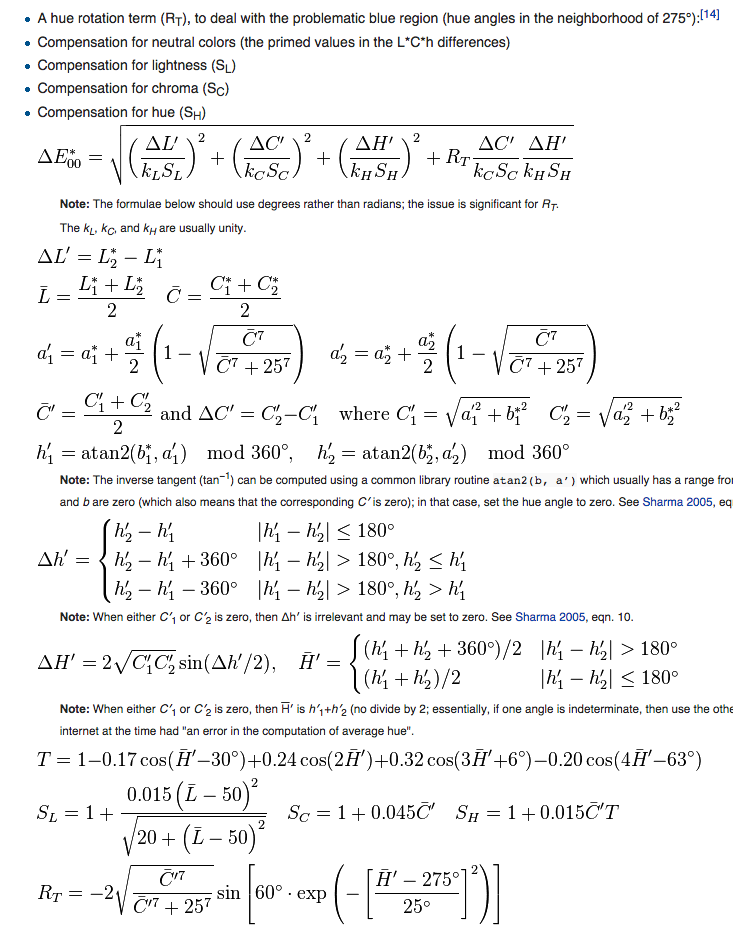
Colorguard uses the CIEDE2000 algorithm to determine the similarity of each of the colors in your CSS file. This algorithm is quite complex, but is used in the broadcasting community as the best approximation of human ability to discern differences in color. RGB on the other hand, is pretty bad at representing differences in color purely based on the numerical difference of the hex values.

Luckily, someone else already implemented CIEDE2000, so I didn't have to. Tight. Cause this thing is mathy as hell.
http://f.cl.ly/items/061h1y0x0G2X2e2t1q1f/Screen%20Shot%202014-07-03%20at%205.55.17%20PM.png

Alpha Transparency

Currently, alpha transparency is just stripped from the colors. So rgb(0, 0, 0) exactly matches rgba(0,0,0,0.5). This is usually fine unless someone is alphatransparency-happy and uses it for darkening and lightening colors too often. It could probably be it's own check in the future that there aren't too many different alpha transparencies of the same color. This is not currently a thing though.

Thanks

  • Stripe - They let me build this at work
  • reworkcss - Makes this work
  • @markusn - Best CIEDE2000 implementation ever

License

Licensed under the Apache License, Version 2.0 (the "License"); you may not use this file except in compliance with the License. You may obtain a copy of the License at

http://www.apache.org/licenses/LICENSE-2.0

Unless required by applicable law or agreed to in writing, software distributed under the License is distributed on an "AS IS" BASIS, WITHOUT WARRANTIES OR CONDITIONS OF ANY KIND, either express or implied. See the License for the specific language governing permissions and limitations under the License.

Resolving all dependencies.. This could take a while as our cache is not yet fully warmed up.